

Clock-in by phone, web, app, or station
Employees can clock in from a landline phone, any supported web browser, our native mobile apps, or an on-site timeclock station based on each team's needs.

Smarter Workforce Automation
Time tracking, payroll reporting, and workforce operations software that helps teams manage hours, job costs, schedules, and field communication without adding complexity.
Free Trial
Put Telephone Timesheets to work for your team. Clock in by phone, web, or app, with scheduling, alerts, reports, and all features included.
Confidence on every shift
Keep your team connected, your managers informed, and your office working with the tools it already knows.
Connected payroll, accounting, and scheduling workflows.
Free trial. No credit card required.
One plan for the whole operation.
No setup fees or long-term contract.
Features
Built for teams that need accurate hours and practical controls without forcing every employee into the same device workflow.
Employees can clock in from a landline phone, any supported web browser, our native mobile apps, or an on-site timeclock station based on each team's needs.
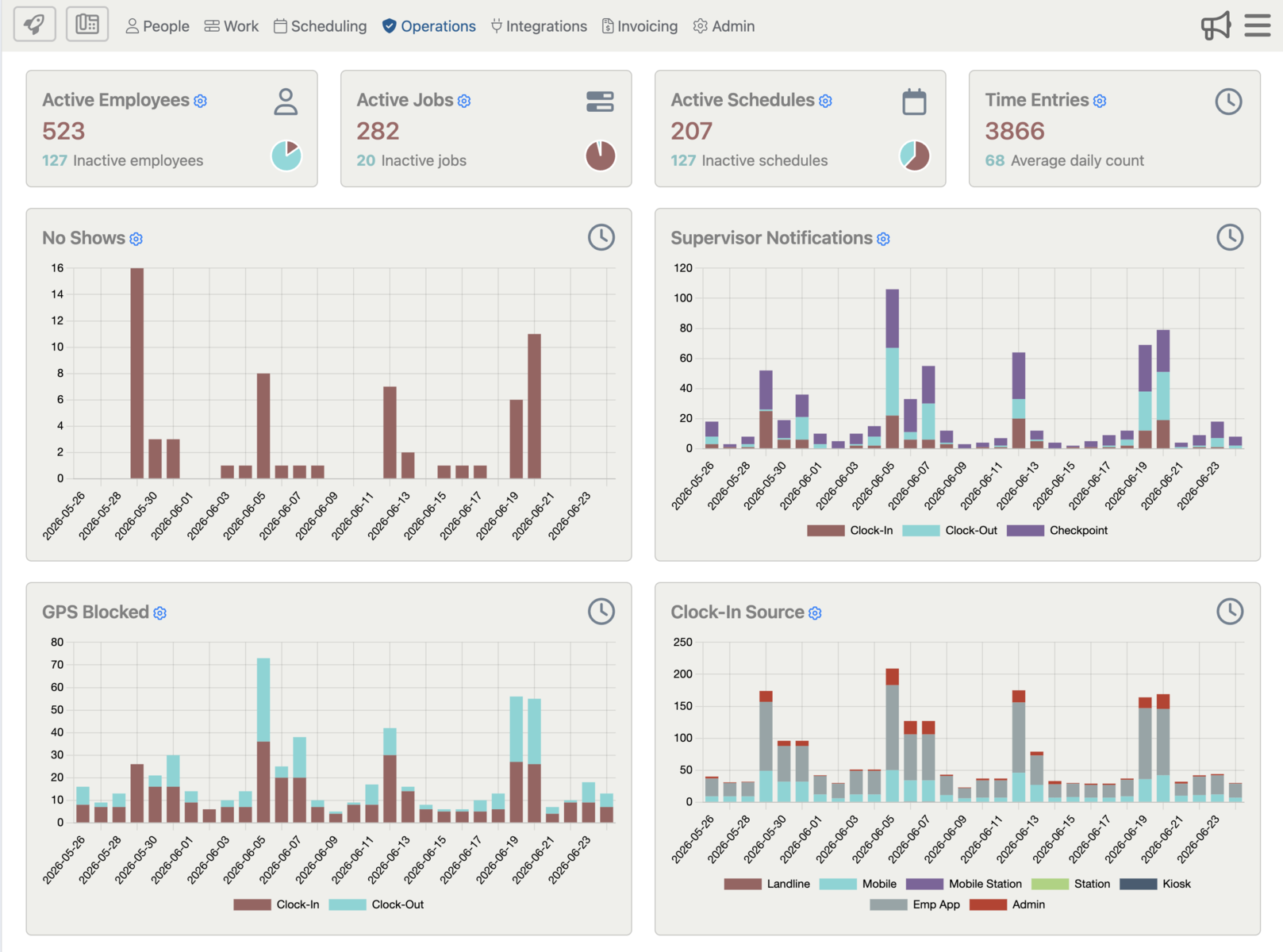
Track scheduled versus actual hours, tardies, no-shows, and active crews from one operations view with supervisor-ready alerts.
Review missed check-outs, breaks, overtime risk, job profitability, and time entry exceptions before exporting or reporting.
Tie hours to sites, customers, job records, notes, GPS-enabled workflows, checkpoints, photos, and shift reports when the operation needs that detail.
Support QuickBooks, WhenToWork, ADP-oriented workflows, third-party payroll files, imports, exports, and open API handoffs.
Launch with basic clock-in and payroll workflows, then add schedules, jobs, reports, portals, employee settings, and custom controls over time.
Industries
Guards can submit incident reports, perform GPS-tracked tours with photos and notes, and generate detailed daily activity reports for your customers and managers.
Let cleaners clock in by app, browser, timeclock, or phone call, then give supervisors schedule coverage, shift alerts, and daily reports without extra paperwork.

Keep valet teams moving with fast clock-ins, real-time shift alerts, coverage notifications, and visibility into team availability and locations.
Support 1099 independent contractors with self-enrollment during first clock-in, job-based hours, and reports that simplify contractor review and payment workflows.

Built to handle rapidly changing schedules. Empowers field employees to capture and submit data using custom forms - simplifying billing, reporting, and compliance.
Dynamic Pricing That Saves You Money
The more users, the lower the average cost per user. Try Telephone Timesheets free for 30 days. No credit card, setup fee, or long-term contract is required. All system features are included in every pricing tier.
Clock in by phone call from a landline or mobile phone, through a web browser or native app, or at an on-site timeclock station.
Start Free TrialWorkflow
Use phone-first clock-in where apps create friction, or blend phone, browser, app, and timeclock options by team.
Bring in crews, jobs, customers, shifts, and coverage expectations so supervisors can see the operational picture.
Tardy alerts, no-show signals, missing check-outs, break prompts, and shift notes surface the work that needs attention.
Run scheduled-versus-actual, payroll, job, overtime, and custom reports without stitching the day together by hand.
Operations
Trigger tardy notices, missing check-out reminders, scheduled reports, and follow-up tasks from the same system that collects the hours.
Use alerts, GPS-enabled workflows, exception reports, and supervisor notes to focus attention on the shifts that need action.

Build schedules around jobs, customers, and work sites, then spot coverage gaps or conflicts before they affect the day.
AI operations overview
Watch how AI-powered notifications, 2-way communication, virtual dispatching, real-time visibility, historical reporting, payroll workflows, and cloud API connectivity work together in one operations system.
Integrations
We integrate with popular payroll and scheduling platforms such as ADP, QuickBooks and WhenToWork, along with other accounting, reporting, import/export, and open API workflows. Use direct integrations where they fit and clean export/import workflows where the back office needs control.
Need something more specific? We can support custom integration paths for your existing systems. Contact us for more information.